Incident: Testmaker Export Outage

· 7 min read
David Dushaj
Technical Product Manager
  • Date of incident: October 28, 2025
  • Recovery time: ~15 hours total impact (5:25 PM EDT Oct 28 - 10:30 AM EDT Oct 29)
  • Impacted product(s): Testmaker, potentially more
  • Primary investigator(s): Ankur Wase, Roberto Crisial, Bo Kaung
  • Incident repair team: Sanjay Akula, Roberto Crisial, Steve Hurlock

Summary

A short summary of the incident, impact, and resolution On October 28-29, 2025, Testmaker experienced a global outage affecting all export and import functionality for instructors. The incident was caused by an AWS account-level public access block configuration change implemented as a security measure on October 28th. This configuration blocked S3 uploads that used the ACL: 'public-read' parameter, which multiple Testmaker applications (scheduler-api, document-api, content-extraction-api) relied upon for file exports and imports. The issue likely also impacted other organizational S3 buckets, including Marketing team's CDN content delivery systems, though these impacts went unreported. The issue was resolved by rolling back the account-level public access block configuration, allowing bucket-level ACL policies to govern access control instead. Impact:

  • 967 4XX errors in CloudWatch to just the testmaker S3 bucket, indicative of export/import errors
  • 16 Service Desk cases from 15 instructors across 13 colleges/universities and 2 high schools
  • Backend manuscript import functionality also affected (internal users only)
  • Likely unreported issues with other S3-dependent systems (e.g., Marketing team's CDN content delivery)

Five+ Whys

Why was Testmaker failing to export files?

Testmaker export function relies on S3 to create and upload files to public blob storage that can then be served to users that need to download it. From the application logs, the S3 upload function was identified as the point of failure.

Why did the S3 upload fail?

An account-level AWS S3 public access block configuration was enabled on October 28th as a security measure to prevent public access to S3 resources across the AWS account.

Why was this change made?

A bug in our home-grown Amazon Q code assisted security tool “AWS Security Command Center” designed to only do a hardening CHECK on the Norton accounts accidentally turned on this public access block feature - this tool was not only checking, but implementing the hardening fixes too.

Why was this tool developed?

Tool was initially developed to manage WAF IPs, to manage 2 IP lists (Deny IP Lists) for LBs and CloudFront. Common tasks needed to be automated as a part of this to ensure parity and consistency. This was the first time the tool was used to do something other than manage WAF IP lists. This tool also helps in an emergency scenario where we need to quickly block ip(s) from threats.

Why was this running in production account?

Because that’s where the compliance checks and audits need to happen and are regularly checked. But this tool automatically runs on all accounts so it was included by default with all the others.

Why was this done without previous lower env testing?

We didn’t think this was something that needed review because the intended purpose of what was supposed happen should have had no impact

Timeline

Timeline of significant known events and updates before, during, and after the incident window

All times in EDT

October 28, 2025

  • 3:00 PM: Security measures implemented in response to threat activity: account-level S3 public access block configuration enabled and WAF rules deployed to block suspected threat actor IP addresses
  • 5:25 PM: First user reports received - global Testmaker export issue identified, Service Desk notified with case tracking protocol; developers alerted

October 29, 2025

  • 7:30 AM: Developers identify S3 upload failures across multiple Testmaker applications (scheduler-api, document-api, content-extraction-api)
  • 7:30 AM: Error pattern identified: ERROR::File-003 : Failed to upload file to given s3 testmaker bucket
  • 7:45 AM: Platform team engaged to investigate potential AWS environment or configuration changes
  • 8:15 AM: Issue escalated as blocker; team huddle initiated
  • 8:30 AM: Credentials validated; AWS CLI uploads successful from workstation using same credentials
  • 9:00 AM: Investigation confirms: Credentials valid, bucket accessible, no recent code deployments related to export functionality
  • 9:15 AM: Code review identifies ACL: 'public-read' parameters in uploadSingleFile and uploadLocalFile methods
  • 9:20 AM: Team investigates both S3 policy changes and concurrent WAF IP blocking changes to isolate root cause
  • 9:30 AM: Triage call started in Incident Response channel; cross-team investigation intensifies
  • 9:45 AM: Connection made between code's ACL requirements and potential AWS policy changes; WAF changes ruled out as cause
  • 10:00 AM: Account-level S3 public access block configuration identified as root cause; lack of AWS audit trail slowed identification process
  • 10:10 AM: Decision made to roll back public access block configuration
  • 10:30 AM: Configuration rollback completed (~20 minutes after decision); testing confirms exports functioning normally
  • 10:35 AM: Status page and service desk notified of resolution

Learned

What didn’t we know before this incident that we now know?

  1. Account-level vs. bucket-level policy hierarchy: AWS account-level public access block configurations override bucket-level ACL policies, creating a cascading failure mode that wasn't previously understood by the development teams.
  2. Gap in change management process: Infrastructure and security changes at the AWS account level can be implemented without review, documentation, or communication to application development teams or the broader organization, creating blind spots for impact assessment
  3. Limited AWS audit trail visibility: AWS does not provide comprehensive, easily accessible audit trails for account-level policy configuration changes, significantly extending the time required to identify what changed and when during incident triage.
  4. Cross-functional dependency mapping: We lack comprehensive documentation and tooling to map application-level dependencies on infrastructure configurations, making impact analysis for infrastructure changes difficult and error-prone.

Open Questions

  • Problem urgency wasn’t clear from original incident message - Platform may have been able to look into and address this sooner but product team was not able to triage until the next morning. What (if anything) can we do about this?
  • Who is responsible for status page/banner to all customers during “global” issues? Who and when to ask about adding status page updates?

Action Items

What action items will we prioritize to mitigate incidents like this in the future? Collated action items from Platform post-mortem meeting

Immediate (1 Sprint)

  • Implement change management process for anything from security going into production
  • Setup a testing & promotion process for Platform operations to be applied to Prod
  • Check other AWS accounts for potential impact and blast radius
  • Monitoring to alert when unexpected 4XX errors occur on S3 buckets

Short-term (1 Month)

  • Establish guardrails around AI tool/script creation and use
  • Understand and document s3 public bucket usage vs private usage

Long-term (1 Quarter)

  • Logging/tracking for access & config changes - (From retro)
  • Synthetic monitoring on user workflows to function as an early warning and detection system
Learning: Subnet scaling maintenance cancellation

· 5 min read

Summary

Planned maintenance

Platform team scheduled an operation to expand the range of available IP addresses for RDS databases in production. This would allow us to scale up our databases and associated resources more aggressively when under heavy demand without "running out" of available address space. We pursued this because of previously measured issues that happened during load testing of event-service in staging environment (You can read more about that here - PLAT-425)

Actual event

However, the configuration of RDS in production prevented us from safely doing this cutover in production as previously communicated, which should have been fast and low risk.  Had we proceeded as previously planned, we would have also needed to fully recreate the actual databases with their contained data, which would have been:

  1. Much riskier than the original proposition presented and
  2. More time consuming, so maintenance would have gone past the 30-minute window we expected

Because of this, David decided to cancel the planned maintenance in favor of rescheduling this later when we have more information and more normalized configurations.

Background

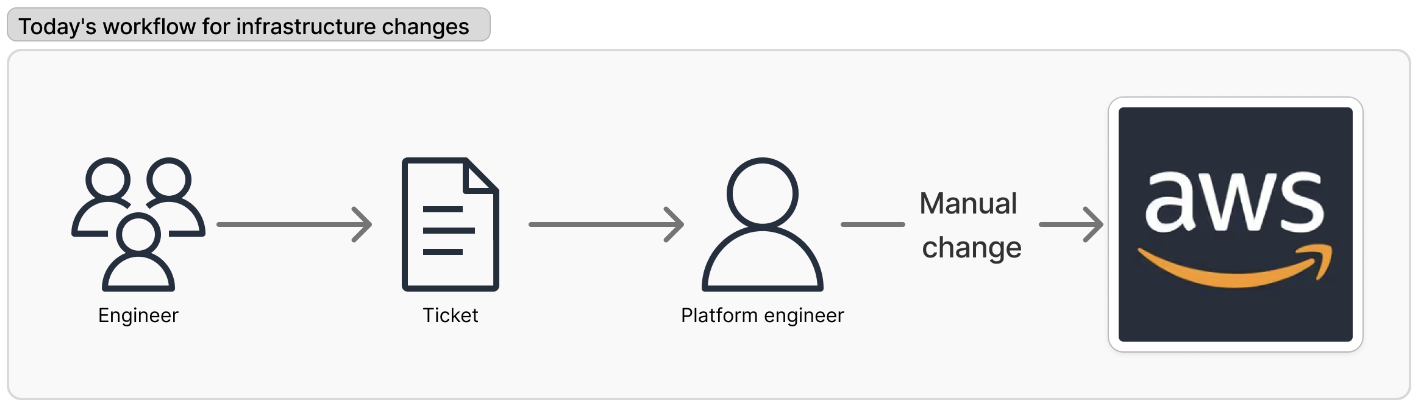
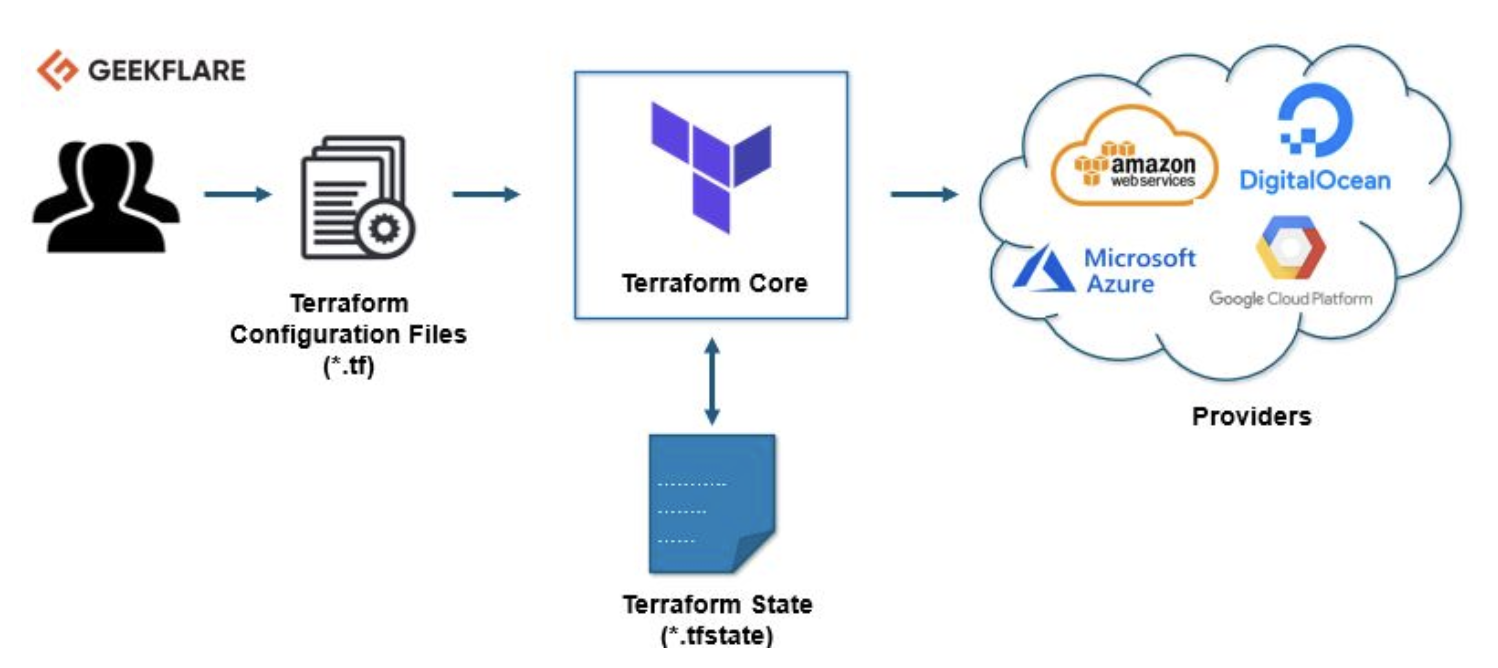
Terraform is an "infrastructure as code" solution that allows any engineer to essentially "declare" infrastructure configurations via code changes. These are then interpreted and expressed to add, change, or remove infrastructure from our cloud provider, i.e. AWS.

Example below - Engineer makes declarative changes in code files that are interpreted by Terraform and then affect our cloud environments

Screenshot

This is highly preferable to the current way of managing infrastructure manually because of improvements to auditability, approval mechanisms, and self-service capabilities for engineering teams.

Screenshot

Migration of AWS infrastructure to be managed by Terraform is currently in progress.

Root Cause Analysis

Why wasn't this identified before

Two main reasons:

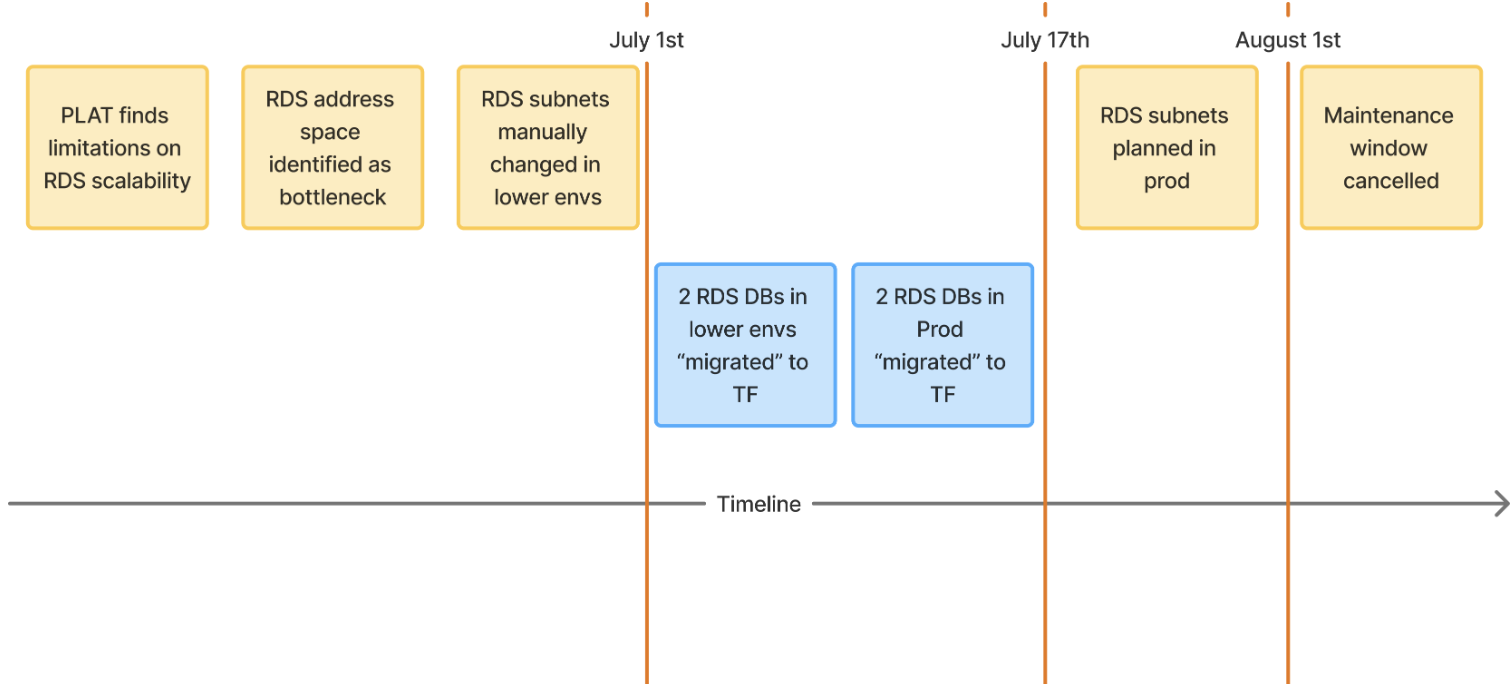
  1. Fractured infrastructure management - Between the timing of Platform team testing and executing in lower env, and planned execution on prod, 2 of the 3 DBs that would have been affected (GenAI and Knewton) were "migrated" to be managed by Terraform in production instead of manually. The previous subnet changes in lower env that we tested were not managed by Terraform, so we only had experience doing this manually in AWS.

Below - rough timeline of RDS changes over the last 1-2 months Screenshot

  1. Unproven Terraform process - Terraform documentation gave no clear indication that changing VPCs or subnets would be potentially destructive. They list the option and some operational parameters, but nothing about databases needing to essentially be "reconstructed" after these changing what we would have needed to change.

    1. https://developer.hashicorp.com/terraform/tutorials/aws/aws-rds
    2. https://registry.terraform.io/providers/hashicorp/aws/latest/docs/resources/db_subnet_group

Because of this, we had no clear indication that making these specific changes could be potentially problematic, outside of directly testing them which we eventually were able to do.

The Result

Rob had a feeling doing this via Terraform may be more destructive than previously thought, which was later confirmed on further research. He worked late the night before (on 7/31) and eventually proved that these changes would be potentially destructive. David elected to cancel the maintenance window as it represented a higher much risk change then previously communicated, and any way of attempting to get this done had been previously untested.

Takeaways

  1. Stale changes / Drift - Subnets effort dragged for too long, causing the infrastructure to not match tested expectations - Subnet migration in lower was completed on July 1st, Prod was planned for August 1st.
  2. Incomplete TF adoption - Some resources in a given AWS product, like RDS, are managed by TF and some aren't which we've seen is a recipe for disaster.
  3. Fractured dev efforts - Too many engineers working on too many different things at once. PLAT team needs to make more effort to have better concerted efforts from start to finish
  4. Untested and unknown - As we have now seen, Terraform documentation may be unreliable in some cases. We can no longer solely rely on these and must directly test any TF changes 1-to-1 in lower envs before attempting in production.

Action Items

Who's involved

We've proved previously that importing existing RDS databases to be managed by TF is a non-disruptive operation. Platform team will work on these migrations and coordinate with application teams to do smoke testing as needed before rescheduling the maintenance window

Breakdown

Most items will be done as part of PLAT Epic - Normalize RDS using Terraform

  1. Normalize management patterns - Get all RDS resources uniformly managed via TF - PLAT-516
  2. Highlight risky changes - Identify destructive vs non-destructive changes that can be made in TF RDS modules since this will be "Self-service for developers" - PLAT-517
  3. Create guardrails - Add in extra protection and approval mechanisms for identified TF fields - PLAT-518
  4. Streamline TF adoption - Lower the barrier to entry for all engineers, not just on Platform, to use and manage RDS infrastructure in this way - PLAT-519
  5. Dry run subnet changes - Create and test TF based workflow in lower envs to have 1-to-1 confidence in this cutover in production.
  6. Reschedule maintenance window - Once we have a more concrete understanding of outage time frame and risk factors, we'll reschedule for another time via DEPLOY-2724

Incident: Cannot Submit Support Ticket Request

· 4 min read
Steve Hurlock
Engineering Manager
  • Date of incident: Sat March 8, 2025
  • Recovery time: 3 hours
  • Impacted product(s): Support Site
  • Primary investigator(s): Anand Patil, Sanjay Akula, Roberto Crisial
  • Incident repair team: Sanjay Akula, Roberto Crisial, Steve Hurlock

Timeline

  • All times EST on Saturday 03/08/25.
  • The outage lasted 8 hours, from 3:30 am to 11:30 am.
  • We became aware of it at 9 am, making our recovery time 2.5 hours.

5:21pm – Kshitij Tilekar reports in the Incident channel: Unable to submit a Support Ticket Request Incident Response I am unable to submit a Support Ticket Request. The Category and Type of Issue drop-downs show no options in them.

5:36pm – There is a discussion about what info comes from Salesforce (since we saw recent issues with Salesforce connections on support2), but Rob and Sanjay see that there are no Categories being populated.

6:26pm – Jared confirms that Categories do not come from Salesforce and contacts Anand.

7:12pm – Anand finds that the support site is not able to connect to MongoDB.

7:55pm – Jared posts an alert about the issue but can't update the support banner.

~8:15pm – Sanjay and Anand restart the support app, but see that it can't connect to MongoDB. Sanjay reboots the support server, but still could not see the mongoDB connection. Sanjay adds an EIP to the EC2 to avoid the IP changing on reboot. Steve adds the new IP address to MongoDB allow list, resolving the issue.

8:22pm – Kashish confirms the fix

8:31pm – Anand posts the following summary:

Investigation Summary

  1. Anand and Sanjay identified the issue: the database was attempting to connect but encountering a timeout error.
  2. We engaged Rob for further investigation, and he suggested creating an Elastic IP address to allow access in MongoDB.
  3. Sanjay created the Elastic IP, and Steve added it to MongoDB Atlas.
  4. Rob confirmed successful communication.
  5. Sanjay restarted the support application.
  6. The database is now connecting successfully.
  7. The support application is loading categories as expected.

Root Cause Analysis

  1. No tickets could be submitted on the Support.wwnorton.com website.
  2. Support EC2 did not have Mongodb connection: why? no restarts happened, timeout in log at what time?
  3. a. instance was not reaching mongo cluster using interface in mongo allow list, could be AWS maintenance b. Mongo db allow list or other action affected this connection.

Learned

What didn’t we know before this incident that we now know?

  1. Should we move the support app to EKS instead of running on EC2?

Action Items

  1. Get logs show Mongodb disconnect time and error message from docker container. Other logs in Graylog and on EC2? Anand & Sanjay
  2. Identify original IP address for the support site - was this affected by IP address cleanup, think not, but need to confirm? Check in Cloudtrail. - Rob
  3. Check with MongoDB for actions taken during this time. - Steve
  4. Discuss pros and cons of moving to EKS - separate meeting
  5. What actions should be taken if this happens again - once root cause identified.
  6. Discuss monitoring for the site, mongodb & salesforce connections, need alerts. -- next meeting
  7. Why are logs not being collected from support site? - check in credential files, need to move to DNS instead of IP? Anand & Sanjay

Incident: DLT Release 19 Login Issue

· 4 min read
Steve Hurlock
Engineering Manager
Claudio Caviglia
Engineering Manager

Why Logging Is Critical for Visibility

· 5 min read
Steve Hurlock
Engineering Manager

When managing complex systems, four overarching themes—Visibility, Testing, Resilience, and Leverage—serve as guiding principles. These themes are interconnected, but at their core, Visibility is foundational. Without visibility, the other three themes lose their efficacy. This post focuses on the critical role of logging in achieving system visibility, exploring why it matters, presenting set of logging guidelines and next steps for development teams.

Incident: Deep Linking Tool (DLT) Login flow

· 8 min read
Claudio Caviglia
Engineering Manager

On 11/25 Patricia Lochary found issues on launching DLT and requested Integrations dev team to look into it (related ticket: INT-2173). After some initial research on 11/26, dev team found clues about Login Web / Testmaker API Gateway having issues in Token generation/validation and requested assistance from team lead (Ankur) to review it. He suggested restarting pods as we did in other opportunities. During that initial check we were notified that at least one instructor reported that he was not able to login into DLT. While we later determined that the login/auth flow were affected, we received no indication that any other service or product was affected, which is why this incident focuses on the DLT Login flow.

Incident: Videos not found

· 6 min read
David Dushaj
Technical Product Manager
Evan Yamanishi
Director of Engineering

Early on 10/4, teams began reporting that some videos on the website and Smartwork were not loading. After investigating, we discovered that the NGINX proxy pointing to Liquid Web was not resolving requests properly. This happened because the NGINX proxy pod restarted in the middle of the night, pulling a new image with code that made videos in Liquid Web unreachable. We rolled back to the previous image to restore service.

While we later determined that routing to most resources on Liquid Web were affected, we received no indication that any other service or asset type was affected, which is why this incident focuses on the videos.

Introducing the Digital Platform

· 16 min read
Evan Yamanishi
Director of Engineering

This post describes the vision and direction for what I'm tentatively calling our "Digital Platform"[^1]—a collection of our tools, services, and operational functionality arranged as a compelling internal product that allows teams to operate more quickly and independently. It imagines how we can transform our DevOps team into a product team that manages our platform as a product.