UX Design
6 Principles for User Centered Design
-
The design is based upon explicit understanding of users, tasks and environments.
-
Users are involved throughout design and development.
-
The design is driven and refined by user-centered evaluation.
-
The design process is iterative.
-
The design addresses the whole user experience.
-
The design team includes multidisciplinary skills and perspectives.
Norton's UX Design Process
Norton practices a user-centered & collaborative design process.
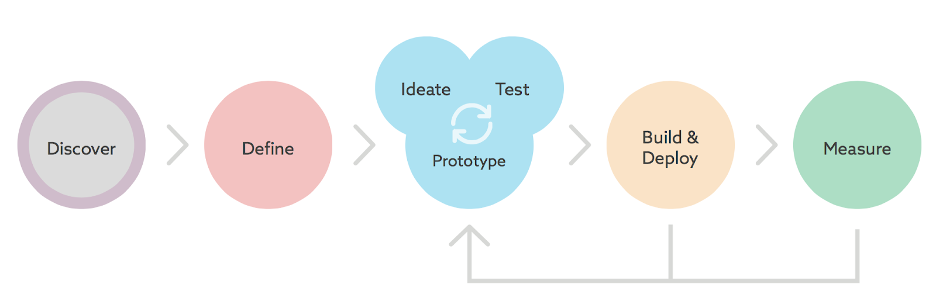
1st Step: Discovery
The discovery stage is about determining the context that the product will be used in.
UX Tools for Discovery:
- User surveys
- User interviews (contextual inquiry research)
- Competitive audit
- Content audit
- Personas
2nd Step: Define
This stage is about getting a firm definition of the product.
UX Tools for Define:
- User Flowcharts
- User Stories
- User Journey map
- Taxonomies
- Sitemap
3rd Step: Design, Iterate, Test
This stage focuses on Interaction Design, how the user will interact with the product.
UX Tools for Design:
- Wireframes & UI Specs
- Visual Design
- Prototypes
- Usability Tests
Supporting Development
UX Designers are involved throughout the build and deployment of our products. We deliver our UI Spec and Visual Design to developers so they know what to build. Then we work closely with them to ensure that the final product delivers a quality user experience.
Sometimes what is originally designed hits a roadblock in development and has to be redesigned to meet technology constraints.
Refining Design Post Launch
After a product launches, analytics and usage data help to inform the future evolution of the product.
Some examples are:
- Website Analytics (like Google Analytics)
- Help Desk Tickets
- A/B Testing
How to Onboard UX Design to Your Project
Use our UX Design Checklist to help keep track of meetings and design progress for your project.
While your project might already be operating on an agile scrum schedule for development to build the product, the design team works ahead of the development team and thus new design meetings will need to be added to your project.
Here are the meetings we require:
-
Design Kickoff meeting (with core product team: Product, Dev, Design & QA)
- Demo existing product
- Discuss scope of design work needed (walkthrough of user stories and/or JIRA tickets)
- Discuss timing when final design is needed
-
Design Stakeholder kickoff
- Discuss user stories with stakeholders
- Demo existing product with stakeholders
-
Weekly Design Reviews with Core Team
-
Weekly Design Reviews with Stakeholders
- Some projects may decide to have only 1 weekly design review meeting with both stakeholders and the core team. This is recommended ONLY when the stakeholders have a high degree of technical knowledge. Otherwise, it is best to have 2 separate meetings so that stakeholders may ask their business questions and the core team has separate time allotted for their technical questions.
Our Design Process always involves these 5 steps for consumer-facing products:
-
Design Kickoff with core team and stakeholders
-
Review of design with core team before it is finalized
-
Review of design with stakeholders before it is finalized
-
Review of design with accessibility before it is finalized
-
Handoff Design Deliverables (UI Spec & Visual Comps)
For an internal Norton product, there are always these 4 steps:
-
Design Kickoff with core team and stakeholders
-
Review of design with stakeholders before it is finalized
-
Review of design with core team before it is finalized
-
Handoff Design Deliverables (UI Spec & Visual Comps)
Deliverables:
-
Design needs requirements to be documented before any design work can begin. We prefer user story format for requirements (who + what + why). However, we recognize that there are projects or functionality where user stories may not be possible. In those situations, JIRA tickets can document requirements.
- Requirements should only describe the problem to address and any known development/system limitations. Who + what + why are the key points in good requirements. How should not be in requirements. User stories and JIRA tickets should not document the solution or include UI solutions (button, dropdown, etc) in the description or acceptance criteria before the design team begins working.
-
Our standard UX Design deliverables are a UI Spec (Word doc) and Visual Design Comps (Zeplin). For very small changes in the design of an existing product, we may post design mock ups directly to a JIRA ticket and document behavior in the JIRA ticket rather than create a full UI Spec.