Explanation: Understanding Our Kubernetes Deployment Architecture
Introduction
This document provides background and context on how we deploy and manage applications in our Kubernetes clusters using Helm charts and Terraform. It explains the underlying concepts, architectural decisions, and rationale behind our deployment approach. Understanding this foundation helps developers make informed decisions when deploying their own applications and troubleshooting deployment issues.
Understanding Kubernetes Application Deployment Challenges
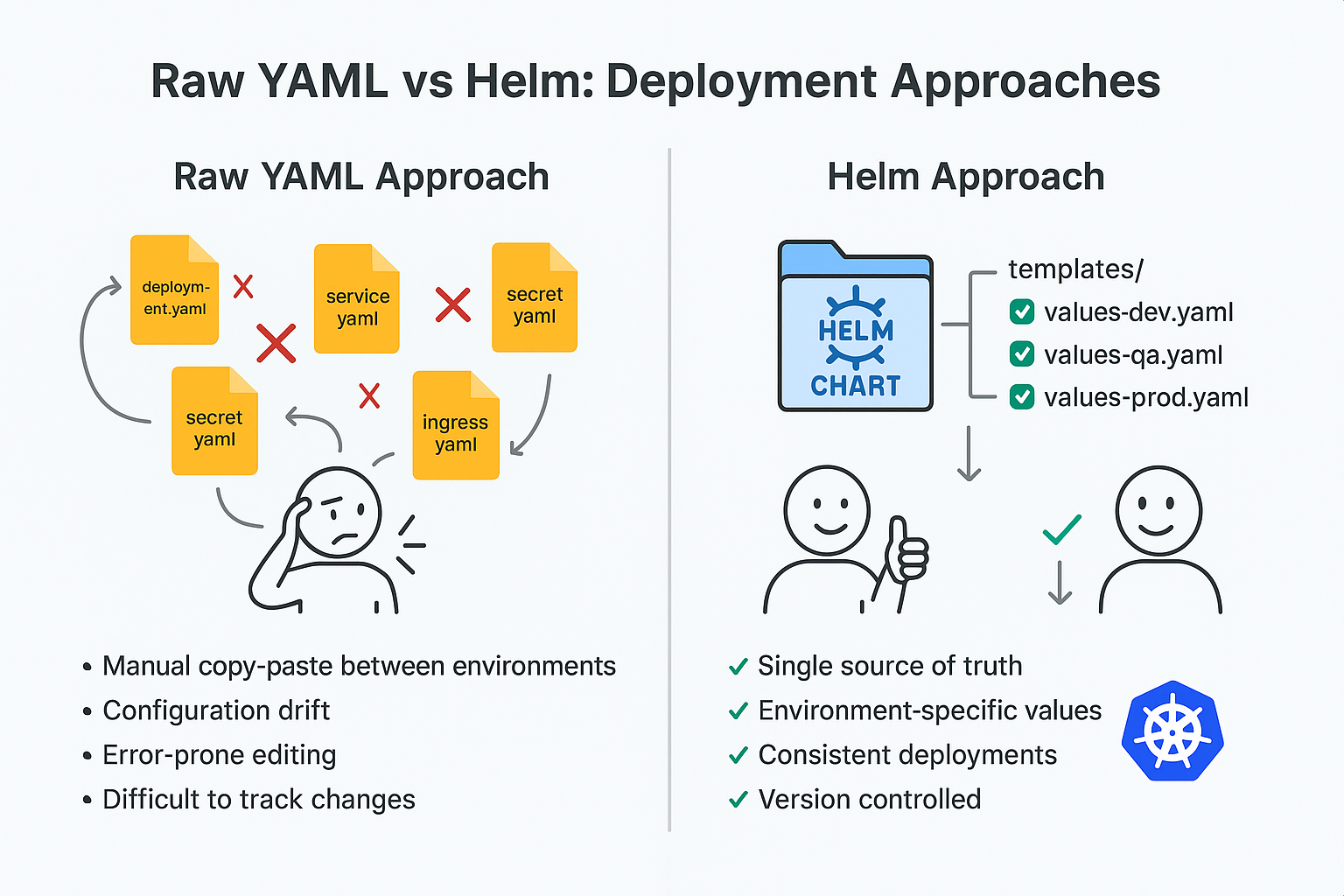
Deploying applications to Kubernetes involves managing multiple interconnected resources—Deployments, Services, ConfigMaps, Secrets, Ingresses, ServiceAccounts, and more. Each application might require dozens of these Kubernetes objects, all properly configured and coordinated. Managing these resources individually through raw YAML manifests quickly becomes unwieldy as complexity grows.
Consider a typical web application deployment: you need a Deployment for the application pods, a Service to expose them internally, an Ingress for external access, ConfigMaps for configuration, Secrets for sensitive data, ServiceAccounts for AWS integration via IRSA, PersistentVolumeClaims for storage, and potentially HorizontalPodAutoscalers for scaling. Each of these resources must reference each other correctly—the Deployment must reference the correct ServiceAccount, the Service must select the right pods, the Ingress must point to the Service, and so on.
Maintaining consistency across multiple environments (dev, qa, staging, production) amplifies this challenge. Each environment needs slightly different configurations—different replica counts, resource limits, ingress hosts, or database endpoints. Without a systematic approach, teams resort to copy-pasting YAML files and manually editing values, leading to configuration drift, deployment errors, and wasted time troubleshooting subtle differences between environments.
What is Helm and Why We Use It
Helm is the package manager for Kubernetes. Just as apt manages packages on Debian systems or npm manages JavaScript libraries, Helm manages Kubernetes applications. It solves the complexity of Kubernetes deployments by introducing the concept of "charts"—packages of pre-configured Kubernetes resources that can be installed, upgraded, and managed as a single unit.
A Helm chart is essentially a collection of template files that generate Kubernetes manifests. These templates use the Go templating language to create dynamic, configurable resource definitions. Instead of maintaining separate YAML files for each environment, you maintain one set of templates and different values files that customize the deployment for each environment.
How Helm Works
Helm operates through a client-side tool (the helm CLI) that communicates with the Kubernetes API server. When you install a Helm chart, Helm:
- Reads the chart files from a local directory or remote repository
- Merges your custom values with the chart's default values
- Renders the templates using these combined values to generate Kubernetes manifests
- Applies the manifests to the Kubernetes cluster via the API server
- Tracks the installation as a "release" with versioning and rollback capabilities
A Helm "release" represents a specific installation of a chart in your cluster. You can have multiple releases of the same chart (e.g., sentry-dev and sentry-prod), each with different configurations. Helm tracks each release's history, enabling you to upgrade releases with new configurations, rollback to previous versions if something breaks, or completely uninstall releases when no longer needed.
The Power of Helm Charts
The Helm ecosystem provides thousands of pre-built charts for popular applications—databases, monitoring tools, CI/CD systems, message queues, and more. These charts are maintained by their respective communities and vendors, incorporating best practices, security configurations, and operational wisdom accumulated over years of production use.
For example, the official PostgreSQL Helm chart handles complexities like StatefulSet configuration, persistent volume management, replication setup, backup configurations, and proper initialization scripts. Rather than figuring out all these details yourself, you leverage the chart and customize it through values. The chart authors have already solved the hard problems; you just need to provide your specific requirements.
Charts also enable consistency across deployments. When everyone uses the same chart templates with different values files, you ensure that all environments follow the same structural patterns. This consistency reduces bugs caused by subtle configuration differences and makes it easier for team members to understand any deployment—they all follow the same template structure.
Why We Chose Helm
We adopted Helm because it provides:
- Reusability: Install the same application multiple times with different configurations
- Configurability: Customize deployments through values files without modifying templates
- Version control: Track chart versions and release history for auditing and rollback
- Community resources: Leverage thousands of pre-built, maintained charts
- Templating power: Generate complex configurations dynamically based on environment
- Simplified operations: Install, upgrade, rollback, and uninstall applications as single units
- Standards: Follow Kubernetes community best practices embedded in chart designs
Helm transforms Kubernetes application management from a manual, error-prone process of juggling dozens of YAML files into a structured, repeatable deployment workflow.
Infrastructure as Code: Why Terraform Manages Our Helm Releases
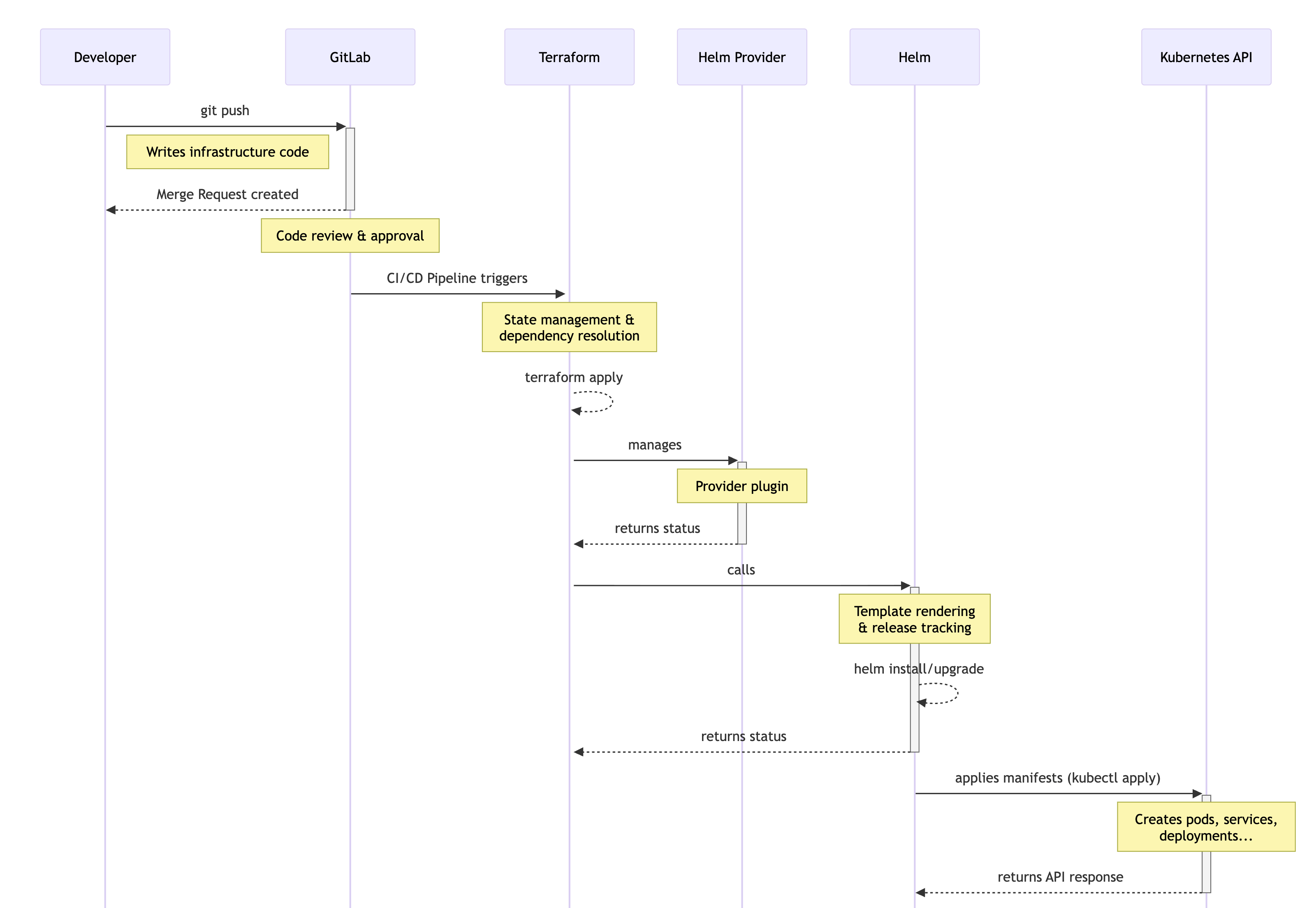
While Helm solves application packaging, we needed an additional layer to manage Helm releases themselves as infrastructure. This is where Terraform enters our deployment architecture. We use Terraform to define and manage Helm releases as infrastructure code, treating application deployments with the same rigor and automation as we treat our AWS resources.
Why Terraform for Helm Management
Terraform is primarily known for managing cloud infrastructure—EC2 instances, S3 buckets, RDS databases, VPCs, and so on. However, Terraform's provider ecosystem extends beyond AWS. The Helm provider allows Terraform to manage Helm releases just like it manages AWS resources.
We chose Terraform to manage our Helm releases because:
Unified infrastructure management: We already use Terraform to provision our EKS clusters, VPCs, IAM roles, and other AWS resources. Managing Helm releases in the same Terraform codebase unifies our entire infrastructure stack. When we provision a new EKS cluster, we can simultaneously deploy our monitoring stack, autoscalers, and other foundational applications—all defined in the same Terraform module.
GitOps workflow: All deployment changes flow through GitLab merge requests. Every Helm release modification—adding a new application, changing configuration, upgrading a chart version—requires creating a branch, submitting an MR, running terraform plan to preview changes, getting team review and approval, and then applying changes through an automated pipeline. This process prevents unauthorized or accidental changes to production systems.
Declarative state management: Terraform maintains a state file tracking the desired configuration of all managed resources. It compares this desired state against actual cluster state and makes only the necessary changes to achieve the desired configuration. This declarative approach means you describe what you want (not how to get there), and Terraform figures out the steps.
Dependency management: Terraform understands resource dependencies. If Helm release B depends on namespace A existing first, Terraform ensures namespace A is created before attempting to install release B. These dependencies are expressed in code, making relationships explicit.
Plan before apply: The terraform plan command shows exactly what changes will occur before you make them. This preview capability is invaluable for catching mistakes. You can see "Terraform will destroy the production database" and realize you made an error—before actually destroying anything.
Audit trail through pipelines: Every infrastructure change runs through our GitLab CI/CD pipelines. These pipeline logs provide a complete audit trail showing who triggered deployments, what changes were applied, when they occurred, and whether they succeeded or failed.
Helm vs Terraform: Understanding the Relationship
It's important to understand that Terraform doesn't replace Helm—it manages Helm releases. When you define a helm_release resource in Terraform, Terraform calls Helm to install or upgrade the release. Terraform acts as the orchestrator, deciding when to install/upgrade releases and with what configuration, while Helm remains the tool that actually performs the installation by rendering templates and applying manifests to Kubernetes.
This layering provides benefits from both tools: Helm's powerful templating and chart ecosystem combined with Terraform's infrastructure-as-code workflow and state management.
Our Cluster-Manager Repository Architecture
The cluster-manager repository is the central source of truth for our Kubernetes infrastructure and application deployments. Understanding its structure helps developers navigate the codebase and know where to make changes.
Repository Organization
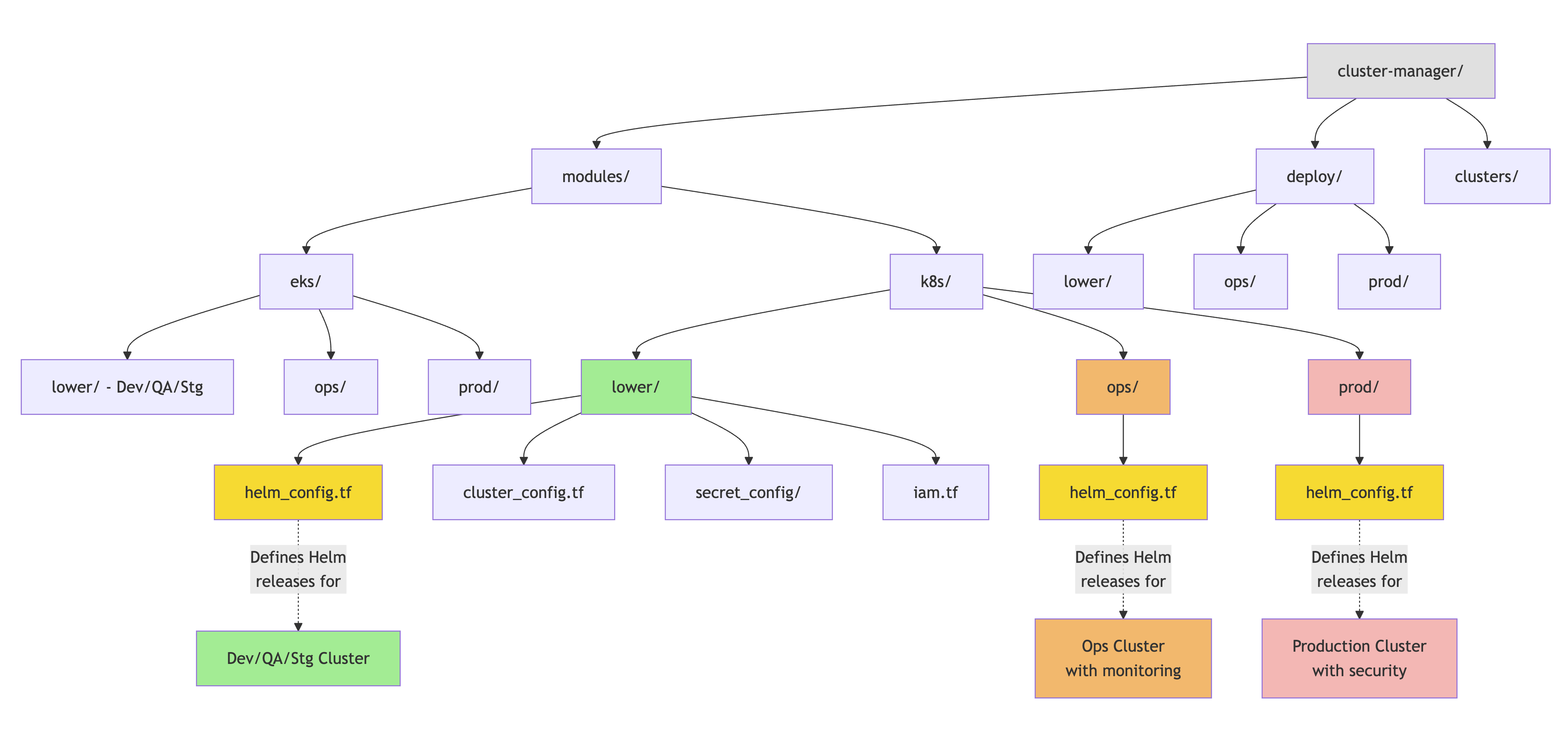
The repository follows a Terraform-standard structure with environment-specific separation:
cluster-manager/
├── modules/
│   ├── eks/          # EKS cluster provisioning modules
│   │   ├── lower/    # Dev/QA/Staging cluster configuration
│   │   ├── ops/      # Operations cluster configuration
│   │   └── prod/     # Production cluster configuration
│   └── k8s/          # Kubernetes-level configurations
│       ├── lower/    # Dev/QA/Staging K8s resources
│       │   ├── helm_config.tf      # Helm releases
│       │   ├── cluster_config.tf   # Core K8s resources
│       │   ├── secret_config/      # Secrets Manager IAM configs
│       │   └── ...
│       ├── ops/      # Operations cluster K8s resources
│       └── prod/     # Production K8s resources
├── deploy/           # Terraform deployment configurations
│   ├── lower/        # Deploy configs for dev/qa/stg
│   ├── ops/          # Deploy configs for ops cluster
│   └── prod/         # Deploy configs for production
└── clusters/         # FluxCD configurations (separate system)
This structure separates concerns clearly:
modules/eks/contains Terraform modules for provisioning the EKS clusters themselves—the control plane, node groups, networking, and cluster-level AWS resourcesmodules/k8s/contains Terraform modules for resources deployed into the clusters—Helm releases, namespaces, RBAC roles, storage classesdeploy/contains the actual Terraform configurations that call the modules with environment-specific variables- Environment separation (
lowervsopsvsprod) isolates changes to prevent accidents affecting production
The helm_config.tf File
Within each environment's K8s module (e.g., /modules/k8s/ops/helm_config.tf), we define all Helm releases for that cluster using Terraform's helm_release resources. This single file acts as the deployment manifest for all Helm-managed applications in that cluster.
A typical helm_release resource looks like:
resource "helm_release" "application_name" {
  name       = "application-name"
  repository = "https://charts.example.com"
  chart      = "application-chart"
  namespace  = "target-namespace"
  version    = "1.2.3"

  set {
    name  = "configuration.key"
    value = "configuration-value"
  }

  set_sensitive {
    name  = "secret.password"
    value = var.sensitive_variable
  }
}
Each helm_release resource defines:
- Where to find the chart: The Helm repository URL and chart name
- What version to install: Explicit version pinning for reproducibility
- Where to install it: Target namespace in the cluster
- How to configure it: Custom values overriding chart defaults
The set blocks provide values that override the chart's default values.yaml. For sensitive values like passwords, we use set_sensitive blocks that reference Terraform variables, keeping secrets out of code files.
Configuration Management Pattern
For applications with substantial configuration, we often use the values parameter to provide an entire YAML values file:
resource "helm_release" "complex_app" {
  # ... basic config ...

  values = [
    templatefile(
      "${path.module}/templates/app-values.yaml",
      {
        database_host = var.database_endpoint
        replica_count = var.environment == "prod" ? 3 : 1
      }
    )
  ]
}
This pattern uses templatefile() to render a values file template with dynamic variables, enabling complex configurations while keeping the helm_config.tf file readable.
Namespace Management
Applications are organized into namespaces for isolation and access control. Common namespaces include:
monitoring: Prometheus, Grafana, Loki, Tempo, OpenTelemetrysentry: Sentry tracking platform- Application-specific namespaces: For major applications or teams
- etc...: Other namespaces as needed
Namespaces can be created directly in Terraform (kubernetes_namespace resources) or through Helm charts that create their own namespace. We typically create namespaces explicitly in Terraform when multiple releases share the namespace or when we need to configure namespace-level resources like quotas or network policies.
Design Rationale: Why This Architecture
Our deployment architecture reflects deliberate choices based on operational requirements and lessons learned from previous approaches. Understanding the reasoning behind these decisions helps appreciate the architecture's benefits and constraints.
Centralized vs Distributed Configuration
We maintain deployment configurations centrally in the cluster-manager repository rather than distributing them across application repositories. This centralization provides several advantages:
Single source of truth: Anyone needing to understand cluster configuration looks in one place—cluster-manager. No hunting across dozens of repositories trying to figure out where something is deployed or how it's configured.
Consistent patterns: All Helm releases follow the same structural patterns because they're defined in the same file with the same conventions. This consistency reduces cognitive load—once you understand one helm_release, you understand them all.
Cross-cutting changes: Modifying something that affects multiple applications (like ingress annotations or monitoring configurations) can be done in one place with one MR rather than submitting dozens of individual changes across repositories.
Platform team oversight: The platform team can review all deployment changes, ensuring they follow best practices, don't conflict with other resources, and align with cluster policies.
The trade-off is that application teams don't have direct control over their deployment configurations—they must submit MRs to cluster-manager. However, the review process is typically fast, and the benefits of centralization outweigh the slight overhead.
Terraform State Management
Terraform maintains state files tracking all managed resources. These state files are stored in GitLab State backend, enabling:
Team collaboration: Multiple team members can work with the same Terraform configuration because state is shared, not local
State consistency: GitLab State backend provides locking to prevent concurrent modifications that could corrupt state
State versioning: GitLab State backend provides history of state changes for recovery if needed
The state file is Terraform's memory—it remembers what resources exist, their current configuration, and how they map to code. Protecting this state is critical; losing it would disconnect Terraform from managed resources.
Explicit Version Pinning
We explicitly specify chart versions in helm_release resources rather than using version ranges or "latest". This explicitness prevents unexpected changes:
Reproducibility: Installing the same code twice produces identical results because chart versions don't change
Intentional upgrades: Chart upgrades require deliberate MR approval, not accidental automatic updates
Rollback capability: We can revert to previous chart versions because we know exactly what version was deployed
The cost is manual effort to stay current with chart updates, but this trade-off favors stability over convenience.
Namespace Isolation
We isolate applications into namespaces for several reasons:
Resource quotas: Namespaces can have resource quotas preventing runaway applications from consuming entire cluster capacity
Access control: RBAC policies can grant teams access to their namespaces without exposing other teams' resources
Network policies: Network policies can restrict traffic between namespaces, improving security posture
Logical organization: Related applications are grouped, making it easier to understand system architecture
Namespaces provide soft multi-tenancy—not perfect isolation, but sufficient for our organizational needs.
Tools and Ecosystem Integration
Our deployment architecture integrates several tools, each serving a specific purpose in the workflow.
GitLab CI/CD
GitLab provides the automation backbone for our deployment process. Pipelines defined in .gitlab-ci.yml orchestrate Terraform execution:
- Terraform plan runs on merge requests for preview
- Terraform apply runs on main branch for deployment
- Pipeline logs provide audit trail
- Access controls ensure only authorized individuals can merge to main
GitLab's merge request workflow provides the human review and approval gates that prevent problematic changes from reaching clusters.
Helm Repositories
Helm charts are distributed through Helm repositories—essentially index files hosted on HTTP servers. Popular charts are available in public repositories:
https://prometheus-community.github.io/helm-chartsfor monitoringhttps://charts.bitnami.com/bitnamifor databases and common applicationshttps://kubernetes.github.io/autoscalerfor cluster autoscaler- Vendor-specific repositories for proprietary software
When defining a helm_release, we specify which repository contains the chart. Terraform fetches the chart from that repository during apply.
AWS Integration
Our Kubernetes clusters run on AWS EKS, integrating deeply with AWS services:
IAM Roles for Service Accounts (IRSA): Kubernetes ServiceAccounts map to AWS IAM Roles, enabling pods to access AWS services like S3, Secrets Manager, and more without static credentials
Application Load Balancers: Ingress resources automatically provision ALBs through the AWS Load Balancer Controller
These integrations are configured through Helm chart values and Kubernetes resource annotations, often referencing IAM roles or AWS resource ARNs defined in the Terraform code.
Comparing Alternative Approaches
Understanding alternatives helps appreciate why we chose our current architecture. Several other approaches exist for managing Kubernetes deployments, each with different trade-offs.
Raw Kubernetes YAML Files
The simplest approach is applying raw YAML manifests directly to clusters using kubectl apply. This works for small deployments but doesn't scale:
Pros: No additional tools required, complete control over manifests, simple to understand
Cons: No templating, no version control of releases, manual environment management, no rollback capability, copy-paste configurations lead to drift
We evolved beyond this approach as complexity grew beyond what manual YAML management could handle.
Kustomize
Kustomize provides YAML templating through overlays and patches. Base configurations are modified per-environment through customization layers.
Pros: Built into kubectl, no template language to learn, declarative patches
Cons: Limited logic capabilities, becomes complex with many environments, no package management, no release tracking
Kustomize is powerful for teams that want to stay close to native Kubernetes but need basic templating. We chose Helm for its ecosystem and Terraform for its workflow management.
ArgoCD / FluxCD
GitOps tools like ArgoCD and FluxCD watch Git repositories and automatically sync Kubernetes resources to match repository state.
Pros: Automatic reconciliation, drift detection, declarative desired state
Cons: Another system to operate, limited to Kubernetes resources, less flexible workflow control
We do use FluxCD for application-level deployments (separate from infrastructure), but chose Terraform for infrastructure because it manages both Kubernetes and AWS resources with strong workflow control through GitLab.
Direct Helm CLI Usage
Teams could use the helm CLI directly from laptops or CI/CD pipelines to manage releases.
Pros: Simple, direct control, fast iteration during development
Cons: No infrastructure-as-code, difficult to track what's deployed where, no state management, manual coordination, challenging to implement approval workflows
Direct Helm usage is appropriate for development/testing but lacks the governance and automation needed for production operations.
Operational Considerations and Trade-offs
Every architectural decision involves trade-offs. Understanding our architecture's limitations helps developers work effectively within its constraints.
Change Velocity vs Safety
Our MR-based workflow with Terraform plan review prioritizes safety over speed. Deploying a new application requires creating an MR, waiting for CI/CD, getting review approval, merging, and waiting for apply pipeline. This process might take 30 minutes to a few hours depending on reviewer availability.
For urgent production incidents requiring immediate deployment changes, this workflow can feel slow. However, the vast majority of deployments are planned, not emergencies. The safety benefits—preventing configuration errors, catching mistakes before they reach production, maintaining audit trails—outweigh the slight delay for planned changes.
For true emergencies, platform team members have the ability to apply Terraform changes manually, bypassing the normal workflow. This escape hatch is rarely needed and heavily audited.
Learning Curve
New developers face a learning curve understanding Terraform syntax, Helm concepts, and our specific architectural patterns. The first deployment feels complex because it touches many systems—Git, GitLab, Terraform, Helm, Kubernetes, AWS.
However, once developers understand the pattern, subsequent deployments become straightforward. The initial investment in learning pays dividends through consistent, reliable deployment processes. This documentation aims to reduce that learning curve by explaining the "why" behind our approach.
Terraform State Limitations
Terraform state can drift from reality if changes are made outside Terraform (e.g., manually modifying a Helm release with helm upgrade). When state diverges from reality, Terraform's next apply may produce unexpected results as it tries to reconcile differences.
To avoid drift, we enforce discipline: all infrastructure changes must go through Terraform. The cluster-manager repository is the source of truth; manual changes should only occur for debugging during incidents, and those changes should be immediately codified in Terraform afterward.
Namespace Boundaries
Our namespace-based organization provides isolation but not perfect security. Kubernetes namespaces are administrative boundaries, not security boundaries. Applications in different namespaces share the same node operating systems, container runtime, and cluster networking.
For workloads requiring stronger isolation, we would need separate clusters, node groups, or other mechanisms beyond namespace separation. Currently, our organizational trust model is appropriate for namespace-level isolation.
Conclusion
Understanding this architecture—why Helm, why Terraform, why GitLab, how they interact—empowers developers to work effectively with our deployment system. The centralized cluster-manager repository, MR-based review workflow, and Grafana-based monitoring create a deployment process that balances speed with safety, autonomy with governance, and flexibility with consistency.
This foundation enables the platform team to avoid becoming a bottleneck. With proper documentation and understanding, any developer can deploy and manage applications in our Kubernetes clusters following the established patterns.
Useful Resources
Here are links to relevant documentation for the technologies involved:
-
Helm:
- Helm Documentation: Official Helm documentation covering all concepts
- Artifact Hub: Search for Helm charts across repositories
- Helm Best Practices: Chart development guidelines
-
Terraform:
- Terraform Helm Provider: Documentation for managing Helm releases with Terraform
- Terraform Kubernetes Provider: Documentation for managing Kubernetes resources directly
- Terraform Best Practices: Community best practices guide
-
Kubernetes:
- Kubernetes Documentation: Official Kubernetes documentation
- Kubernetes API Reference: Complete API documentation for all resource types
-
GitLab CI/CD:
- GitLab CI/CD Documentation: Pipeline configuration and usage
- GitLab Terraform Integration: Using Terraform in GitLab pipelines