Explanation: Understanding Secret Management with AWS Secrets Manager
Introduction
This document provides background and context on how application secrets are managed using AWS Secrets Manager within our Kubernetes environment. It aims to clarify the underlying concepts and rationale behind this approach, following the principles of explanatory documentation.
Moving Beyond Kubernetes Secrets
Historically, application secrets might have been managed directly within Kubernetes using native Secret objects. While functional, this approach presented challenges related to centralized management, auditing, granular access control, security, and rotation across multiple applications and environments.
To address these challenges and leverage cloud-native capabilities, we have adopted AWS Secrets Manager as the central, authoritative source for storing and managing application secrets. This aligns with modern security best practices and integrates seamlessly with our AWS infrastructure.
The Core Concept: Centralized Secrets in AWS
At its heart, the system relies on storing sensitive configuration data (API keys, passwords, certificates, configuration snippets) securely within AWS Secrets Manager.
-
Single Source of Truth: Secrets for all environments (
dev,qa,stg,production) and applications reside within AWS Secrets Manager, organized using a consistent naming convention:<environment>/<namespace>/<type>/<app_name>(e.g.,production/ncia/php/dlp). This structure is crucial for organization and automated permission management defined in the Cluster-Manager repository. -
Security & Compliance: AWS Secrets Manager provides encryption at rest and in transit, fine-grained access control through AWS IAM, and detailed audit trails via AWS CloudTrail, helping meet security and compliance requirements.
-
Self-service, Managed Access: Direct management (viewing, editing) of these secrets is handled through the AWS Management Console. Access is granted via temporary credentials obtained through AWS Identity Center (SSO) using team-specific roles (e.g.,
Ncia,Ebook), ensuring teams can only manage secrets relevant to their designated namespaces and applications as defined by Permission Sets.
How Applications Consume Secrets: The Bridge via CSI
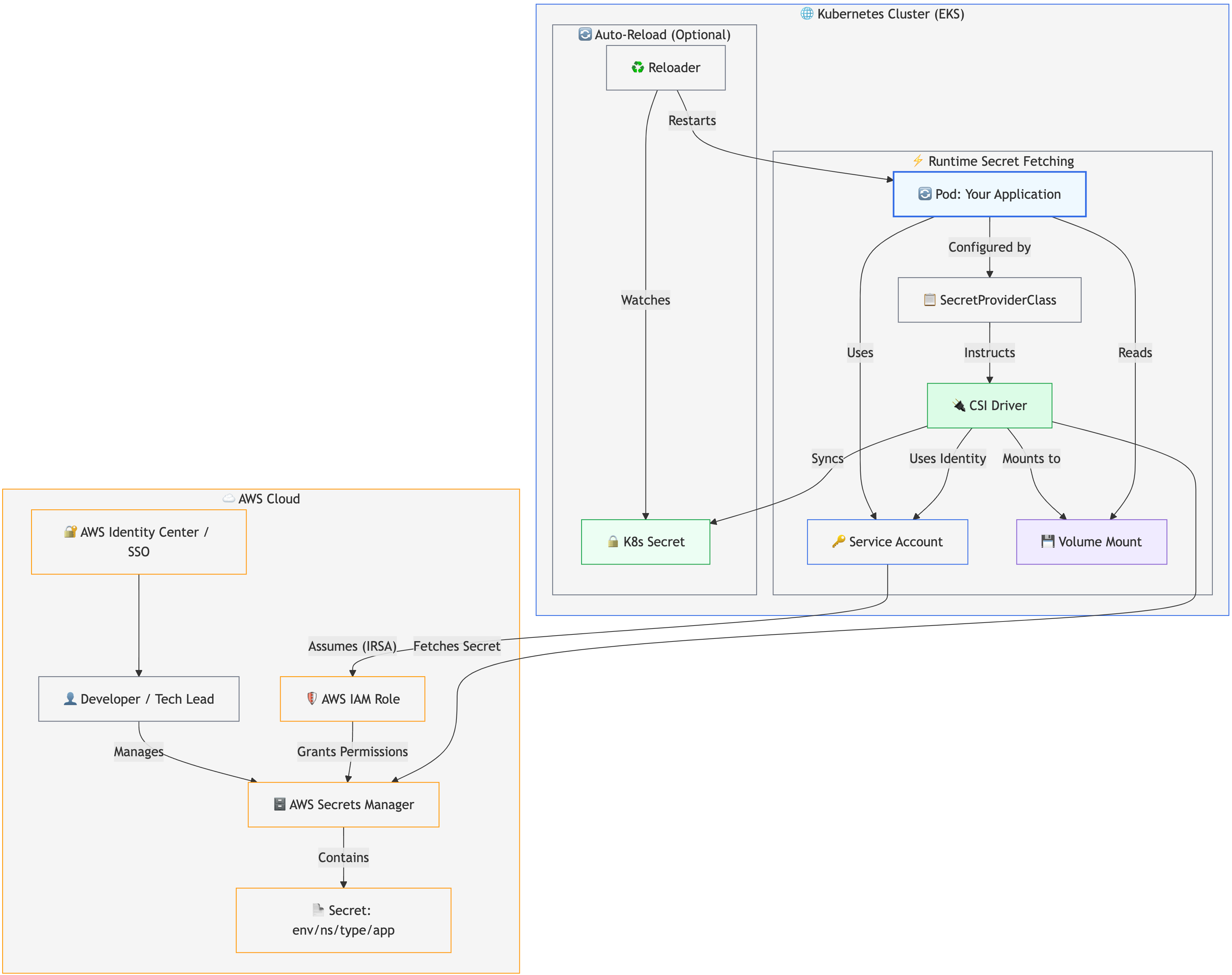
Applications running in Kubernetes pods do not directly query the AWS Secrets Manager API. Instead, a secure and standardized mechanism bridges the gap: the AWS Secrets Store Container Storage Interface (CSI) Driver.
This approach decouples the application from the specifics of secret retrieval:
- Identity: Each application pod runs with a specific Kubernetes
ServiceAccount(e.g.,dlp-sa). This account name follows the<app-name>-saconvention. - Authorization: This
ServiceAccountis linked (via IAM Roles for Service Accounts - IRSA) to an AWS IAM Role crafted by the platform team's automation (triggered by changes in the Cluster-Manager repository).- Note: This IAM Role grants the necessary
secretsmanager:GetSecretValuepermissions, but only for the specific secrets the application is authorized to access based on its namespace, environment, and the configuration in Cluster-Manager.
- Note: This IAM Role grants the necessary
- Request Definition: A Kubernetes resource called
SecretProviderClass(defined within the application's Helm chart, typically at./chart/templates/secretproviderclass.yaml) acts as a manifest. It lists the specific secrets (by their full AWS Secrets Manager path/objectName) that the application requires and gives them a localobjectAlias. - Retrieval & Mounting: The AWS Secrets Store CSI Driver, a component running on the cluster nodes, detects the
SecretProviderClass. When an application pod starts, the driver uses the pod's Service Account identity to assume the linked IAM Role, securely fetch the requested secrets from AWS Secrets Manager, and mount them as files into a designated volume within the pod (typically under/mnt/creds/). - Application Usage: The application code simply reads the required secrets from these mounted files as if they were local configuration files.
Pictured below: Diagram of how AWS Secrets Manager interacts and is used with the EKS cluster
Synchronization and Automatic Reloading (Optional but Recommended)
To simplify consumption or maintain compatibility with applications expecting standard Kubernetes Secret objects (e.g., for populating environment variables), the SecretProviderClass can be configured via the secretObjects section to also synchronize the fetched secret data into a native Kubernetes Secret within the application's namespace.
When this synchronization is enabled, another component, the Stakater Reloader, comes into play. It monitors these synced Kubernetes Secret objects (identified by an annotation on the Deployment). If the Reloader detects a change in the K8s Secret (originating from an update in AWS Secrets Manager, fetched by the CSI driver, and synced), it automatically triggers a rolling restart of the application's deployment. This ensures pods gracefully pick up the updated secret values without manual intervention.
Design Considerations & Alternatives
This architecture was chosen to:
- Leverage AWS Native Security: Utilize robust AWS features for secret storage, access control, and auditing.
- Decouple Applications: Applications don't need AWS SDKs or credentials embedded just for secret retrieval; they interact with standard file mounts or Kubernetes Secrets.
- Automate Access: Rely on IRSA for securely granting permissions without managing static credentials for pods. The link between K8s Service Accounts and AWS IAM Roles is managed centrally via infrastructure-as-code (Cluster-Manager).
- Centralize Definition: Use
SecretProviderClasswithin the application's own chart to declare its secret dependencies. - Enable Automation: Facilitate automatic updates via the Stakater Reloader.
Secret Management with CSI Secret Store
Managing Multiple Secrets with a Single Volume
This deployment uses the Kubernetes CSI Secret Store driver to manage multiple secrets efficiently through a single volume mount. This approach provides several advantages:
Configuration Pattern
Instead of creating multiple volumes for different secrets, we use a single CSI volume with multiple subPath mounts:
volumes:
  - name: iig-service-secrets
    csi:
      driver: secrets-store.csi.k8s.io
      readOnly: true
      volumeAttributes:
        secretProviderClass: "iig-service-secrets"

volumeMounts:
  - name: iig-service-secrets
    mountPath: "/mnt/creds/creds.env.json"
    readOnly: true
    subPath: "creds.env.json"
  - name: iig-service-secrets
    mountPath: "/mnt/jwt_key/jwtRS256.key"
    readOnly: true
    subPath: "jwtRS256.key"
  # Additional mounts for other secrets...
Benefits
- Resource Efficiency: Single volume reduces Kubernetes resource overhead
- Simplified Management: All secrets managed through one SecretProviderClass
- Consistent Security: Uniform access control and encryption policies
- Easier Debugging: Single point of failure analysis for secret-related issues
SecretProviderClass Integration
The SecretProviderClass defines all secrets that will be available through the single volume. Each secret is mapped to a specific objectAlias that corresponds to the subPath used in volume mounts. This ensures proper isolation while maintaining simplicity.
Alternatives Considered
While other secret management solutions exist, we did some evaluation during POC phase to compare and found them either overkill or lacking
-
Akeyless - Awesome, but offered many features that we would not use at the end (Overkill and expensive).
-
HashiCorp Vault - Worked fine to achieve our end (and it's free) but required 5x the amount of configuration in our infrastructure and per application implementation.
The basic reason we chose AWS Secret Manager was because it is easy to integrate with our current infrastructure and because we are leveraging all other AWS features like SSO natively into it. This approach provides deep integration with our existing AWS ecosystem and tooling. Understanding this flow helps in diagnosing issues and effectively managing your application's configuration. The key trade-off is the dependency on the CSI driver and the associated Kubernetes resources (SecretProviderClass, ServiceAccount).
Useful Resources
Here are links to relevant documentation and resources for the technologies involved:
- AWS Secrets Manager:
- AWS Secrets Manager User Guide: Official documentation covering all aspects of AWS Secrets Manager.
- Integrating Secrets Manager with EKS using IRSA: Specific AWS guide on the core integration pattern described in this document.
- Kubernetes Secrets Store CSI Driver:
- Secrets Store CSI Driver Book: Official documentation for the core CSI driver, explaining its functionality.
- AWS Secrets Manager and Config Provider for CSI Driver: GitHub repository and documentation for the specific AWS provider plugin used by the CSI driver to interact with Secrets Manager.
- IAM Roles for Service Accounts (IRSA):
- IAM Roles for Service Accounts (EKS Documentation): Official EKS documentation explaining how IRSA works.
- Stakater Reloader:
- Reloader GitHub Repository: The source code and primary documentation for the Reloader tool used for automatic restarts.
- Kubernetes Concepts:
- Kubernetes Secrets: Official Kubernetes documentation on native Secret objects.
- Mirantis: What are Kubernetes Secrets?: An introductory article explaining Kubernetes Secrets (useful for background).
- Kubernetes Service Accounts: Official Kubernetes documentation on Service Accounts.
- AWS Access Management:
- AWS Identity Center User Guide: Documentation for AWS SSO, used for managing console access to Secrets Manager.